How to use Pinterest offline
What Pinterest lets you keep on your phone, how to take whole boards you made offline in a separate app, and what works with no connection.
Guides, , 6 min read

You’re going somewhere with no signal: a flight, a venue, a site visit, a kitchen where the Wi-Fi gives up. The board you need is on Pinterest. This guide covers what Pinterest itself lets you keep on your phone, and how to take whole boards with you in a separate app.
What Pinterest offers
Pinterest’s help pages don’t describe a way to use the app offline. They draw a clear line between saving a pin and downloading one. Its help page on downloading says that saving a pin adds it to one of your boards, and downloading a pin saves the image to your device.
So a board you’ve saved to isn’t on your phone. To keep pins for when you’re offline, Pinterest lets you download them one image at a time:
- In the app: tap the pin, tap the ellipsis icon underneath it and choose Download image. On an iPhone the image goes to Photos. On Android it goes to your gallery.
- On a computer: select the pin, click the ellipsis icon next to the image and choose Download image.
Pinterest notes that not all pins can be downloaded. What you get is the picture on its own: no title, no link, and nothing to tell you which board it came from. For a few pins that’s fine. For a whole board it’s slow, and the photos end up mixed in with everything else on your phone.
Pinterest also lets you request a copy of your account data, but that is a different thing, covered in our guide to downloading a Pinterest board.
Taking whole boards offline in Pinx
Pinx is our app for iPhone, iPad and Android. It signs in with your Pinterest account and opens the boards you made. It can download a board to your phone so you can open it with no connection at all.
There are three ways to start:
- From your boards: press and hold a board and choose Download for Offline.
- From the board: open it, tap the More button (the three dots) at the top and choose Download for Offline.
- With a swipe: swipe right on a board in your list of boards and tap Download.
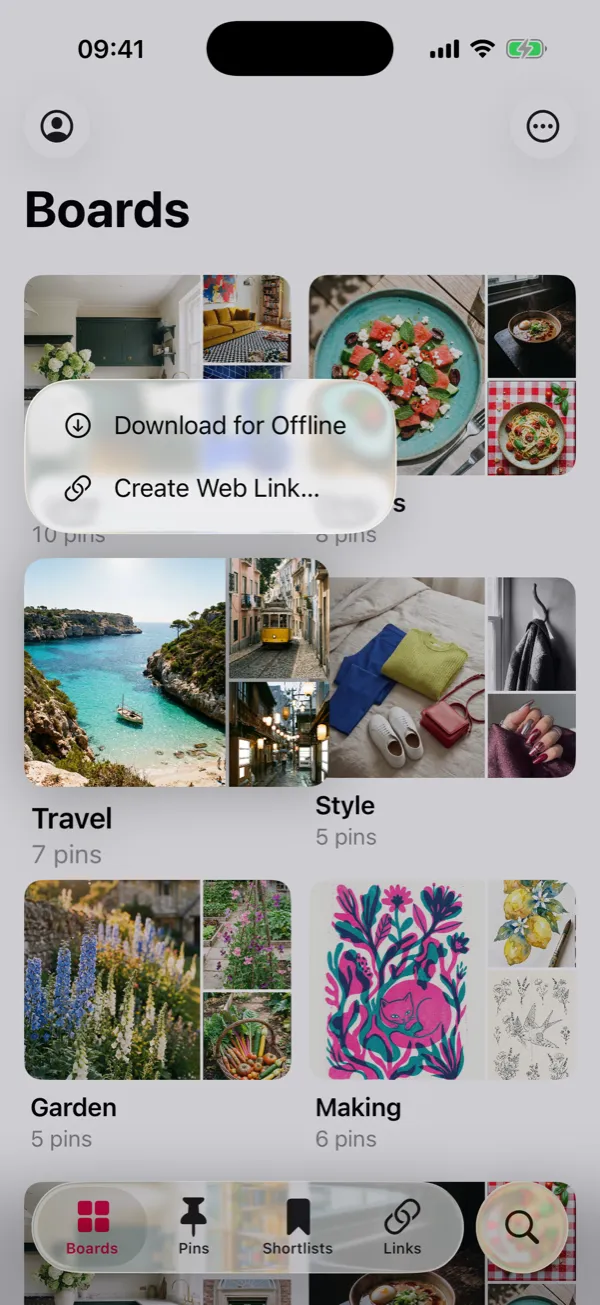 Press and hold a board to download it. The boards and pins are Pinx’s demo examples.
Pinx saves every pin on the board, with its full-size image, its title, its description and its link, and the board’s sections. When it’s done, the board says Available offline under its name, and a small download mark appears on its cover in your list of boards.
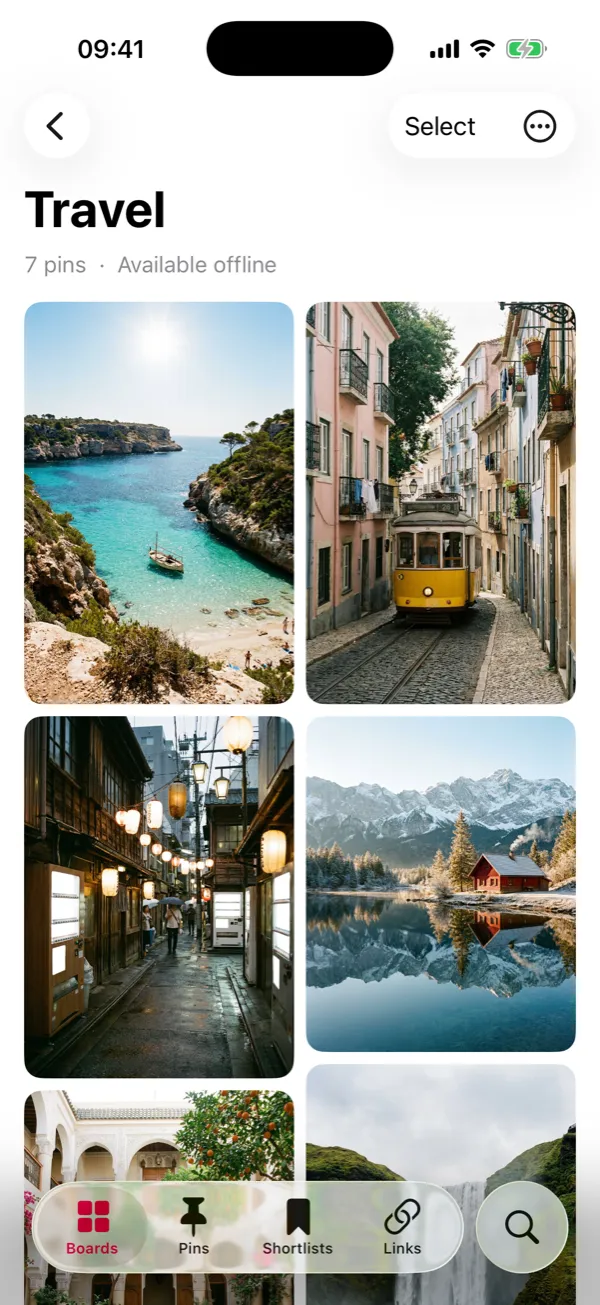 A board that has finished downloading.
While a board downloads, its header shows how far it has got. Keep Pinx open until it finishes. If the download is interrupted, it picks up again when you’re back online or next open the app.
What works with no connection
| In Pinx | With no connection |
|---|---|
| Boards you downloaded | Open in full, with every image |
| Search | Works, for every pin Pinx has loaded |
| Shortlists, notes and tags | Work. They are kept on your phone |
| Boards you didn’t download | May show pins you’ve looked at recently, but don’t count on it |
| Sharing pins as a web page | Needs a connection |
| Signing in for the first time | Needs a connection |
When you’re offline, the top of your boards says Offline · Showing saved boards. A board that has nothing saved shows Not Available Offline.
Space, Wi-Fi and tidying up
Go to Settings and tap Downloads, under Storage. You’ll see:
- Download on Wi-Fi Only. It is off to begin with. Turn it on and downloads pause on mobile data and carry on when you’re back on Wi-Fi.
- Downloaded boards, each with the space it takes up.
- Remove All Downloads. The boards stay in Pinx. You just need a connection to see them again.
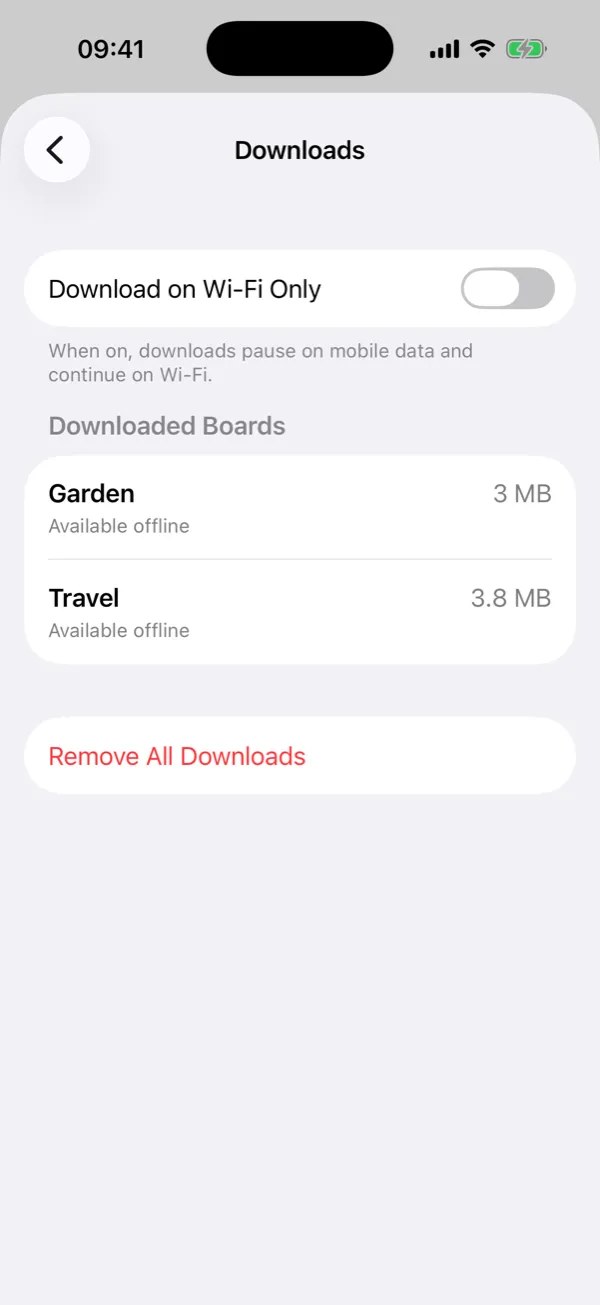 Settings › Downloads shows what’s on your phone and how much space it uses.
To remove one board, swipe right on it in your boards and tap Remove Download.
Keeping a downloaded board up to date
A download is a copy of the board as it was when you downloaded it. If you save more pins to the board on Pinterest, open the board in Pinx while you’re online, or pull down to refresh, and the new pins appear. Their images aren’t saved for offline until you download the board again: remove the download, then download it once more.
What Pinx can’t do:
- Other people’s boards. Pinterest only lets other apps open boards you created, so Pinx can’t download boards you follow, or your home feed.
- Videos. Pinterest doesn’t share pin videos with other apps. For a video pin, Pinx keeps its cover image.
- Change anything on Pinterest. Pinx only reads. Downloading a board in Pinx doesn’t change it on Pinterest.
Pinx is free for 25 boards of your choice, with up to 50 pins on each, and you can download any of those. Pinx Pro opens every board and every pin, and downloads whole boards. It is a single purchase of £2.99 or $2.99, not a subscription, and it covers iPhone, iPad and Android. Get Pinx.
Which to use
| What you want | What to do |
|---|---|
| Keep one or two pins for later | Download image on each pin in Pinterest |
| Take a whole board with you | Download for Offline in Pinx |
| Find a pin while you’re offline | Search in Pinx, which runs on your phone |
| Keep a copy of a board on a computer | Export it. See how to download a Pinterest board |
Common questions
Does Pinterest work offline?
Pinterest’s help pages don’t describe an offline mode. You can download single images from pins to your phone and look at those offline.
Can I save a Pinterest board to my phone?
Not in the Pinterest app, which downloads one image at a time. Pinx downloads a whole board you made, with each pin’s title, description and link as well as the image.
How much space does a downloaded board take?
It depends on how many pins it has and how large their images are. In Pinx, Settings › Downloads shows the space each downloaded board uses, and you can remove any of them there.
Will a downloaded board update itself?
Open it in Pinx while you’re online and it shows pins you’ve added since. To keep their images for offline too, download the board again.
Can I watch video pins offline?
No. Pinterest doesn’t share pin videos with other apps, so Pinx keeps the cover image of a video pin.
Pinx is independent. It is not affiliated with, endorsed by or sponsored by Pinterest, Inc. We checked Pinterest’s download steps against its help pages on 1 October 2026.