How to find a pin you saved on Pinterest
How to search only your own pins on Pinterest, why a pin you hearted isn’t saved, how to use favourites and board order, and what a separate app adds.
Guides, , 6 min read

You saved it months ago, it was exactly right, and now it’s lost among a few thousand others. Pinterest has ways to look through your own pins rather than everyone’s, but they are easy to miss. This guide covers them, the one thing that catches most people out, and what a separate app can add.
Search only your own pins
Pinterest’s search looks across all of Pinterest unless you tell it otherwise. Its help page describes how to search your saved pins instead:
- On a computer: click the search bar at the top, type what you’re looking for, then click Search your Pins at the bottom right of the search bar. After a search, you can also click the arrow-down icon on the right of the search bar and choose Your Pins.
- In the app: tap the search icon at the bottom of the screen, type in the search bar, then scroll to the bottom of the list and tap Search your Pins.
The help page doesn’t say which parts of a pin that search looks at. If a word you remember doesn’t bring it up, try a word that would be in the pin’s title, or the name of the board you’d have saved it to.
If you hearted it, you didn’t save it
This is the most common reason a pin can’t be found. The heart on a pin is a reaction. Pinterest’s help page on reactions says that reacting shares your opinion with the person who made the pin, but does not save it, and that to see a pin later you need to save it to a board.
Pinterest’s help pages don’t describe a list of the pins you’ve reacted to. If you want to keep something, press Save and pick a board.
Star the pins that matter most
Pinterest has favourites, marked with a star rather than a heart. Its help page gives the steps:
- To mark one: open one of your boards and click or tap the star-outline icon at the bottom right of the pin. Only you and anyone you’ve invited to the board can see it.
- To see them all: go to your profile, open the Pins section and choose Favourites.
Keep your boards in an order you can scan
Pinterest can sort your boards for you. Its help page lists three orders:
- A to Z, alphabetically.
- Last saved to, with the boards you’ve saved to most recently first.
- Custom, where you drag boards into your own order.
On a computer, open your profile, click Saved and use the filter icon above your boards. In the app, open your profile, tap Boards and use the arrows icon.
If a board seems to have gone, Pinterest’s help page on missing pins and boards suggests a few causes:
- You archived it. Archived boards sit at the end of your boards. On a computer you can also search your Boards tab for its name.
- You’re signed in to a second account, perhaps one created by signing in with Google or Apple.
- The board opened on another tab. Tap All saves to see the pins you saved.
- You deleted it. Pinterest says deleted boards can be recovered for seven days, and deleted pins can’t be recovered at all.
Searching your pins in Pinx
Pinx is our app for iPhone, iPad and Android. It signs in with your Pinterest account and opens the boards you made. Its search is built for finding things you saved:
- It looks at more of each pin: the title, the description and the board name, and your own notes and tags.
- It runs on your phone, so results appear as you type, and it works with no connection at all.
- You can narrow it to one board, one tag, pins with notes, or boards you’ve downloaded for offline.
- It covers every pin Pinx has loaded. To load them all at once, tap Index All Boards on the search screen.
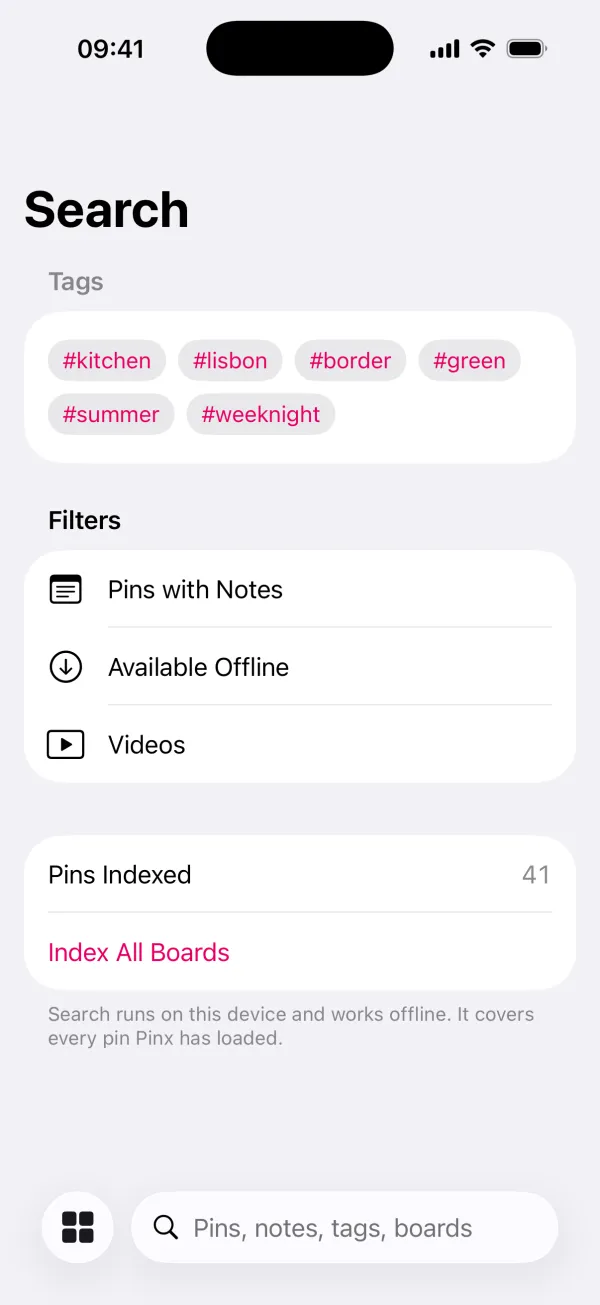 The search screen before you type: your tags, the filters and how many pins are indexed.
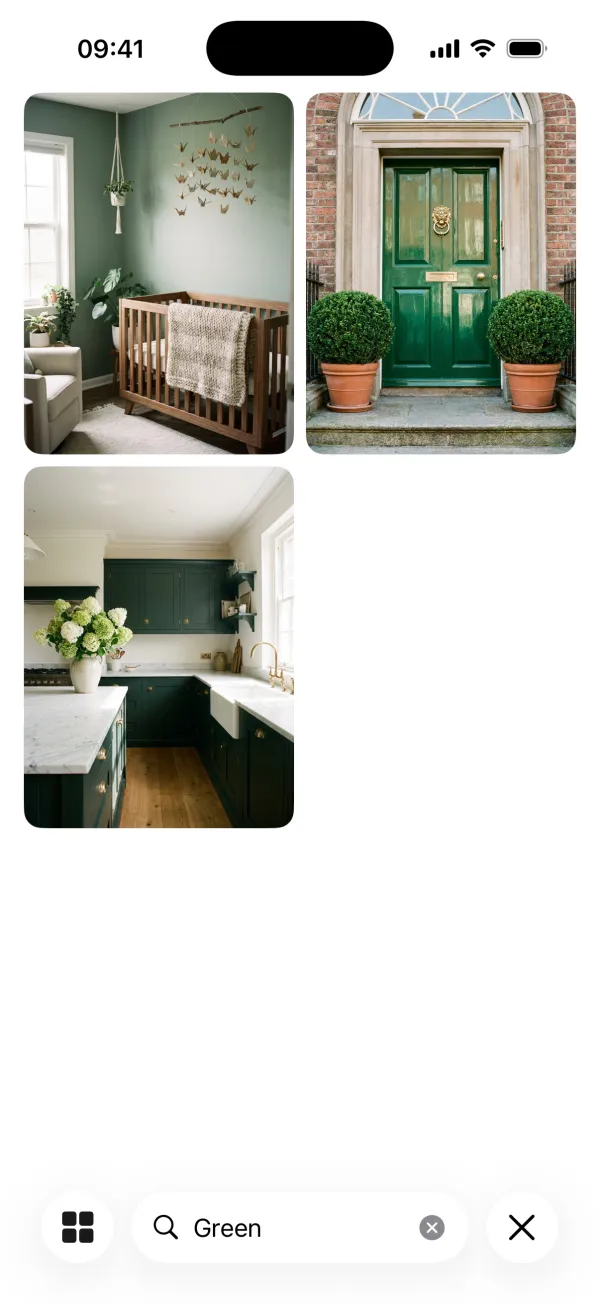 A search for “green” finds pins by title across every board. The boards and pins are Pinx’s demo examples.
Two things make pins easier to find next time:
- Notes and tags. Open a pin and add a note, such as which room it was for or what you decided, or a tag like #hallway. Search finds both. They stay on your phone and are never added to Pinterest.
- Shortlists. Long-press any pin and choose Add to Shortlist to gather pins from different boards in one place, without making a new Pinterest board.
On an iPhone or iPad, your boards and shortlists also show up in the phone’s own search.
What it can’t do:
- Other people’s boards and pins you only hearted. Pinterest only lets other apps open boards you created, so Pinx searches the pins you saved to your own boards.
- Change anything on Pinterest. Pinx only reads. Your notes, tags and shortlists live in Pinx, not in your Pinterest account.
Pinx is free for 25 boards of your choice, with up to 50 pins on each, and search covers those. Pinx Pro opens every board and every pin, so search covers all of them. It is a single purchase of £2.99 or $2.99, not a subscription, and it covers iPhone, iPad and Android. Get Pinx.
Which to use
| What you want | What to do |
|---|---|
| Find a pin you saved | Search your Pins in Pinterest’s search |
| Find a pin you hearted | Look for it again, then Save it to a board. Hearting doesn’t save it |
| Keep a few pins where you can find them | Star them as Favourites in Pinterest, or add them to a shortlist in Pinx |
| Find a board that’s gone missing | Check archived boards and which account you’re signed in to |
| Search by your own notes and tags, or offline | Search in Pinx |
Common questions
How do I search only my own pins on Pinterest?
Type your search, then choose Search your Pins: at the bottom right of the search bar on a computer, or at the bottom of the list in the app.
Where do my hearted pins go?
Nowhere you can look them up. Pinterest says reacting to a pin doesn’t save it, and its help pages don’t describe a list of pins you’ve reacted to. Save a pin to a board if you want to keep it.
Why can’t I find a board I made?
It may be archived, in which case it’s at the end of your boards. You may also be signed in to a different account. Pinterest says a deleted board can be recovered for seven days.
Can I search my Pinterest pins offline?
Pinterest’s help pages don’t say its search works offline. Pinx searches on your phone, so it works without a connection for every pin it has loaded.
Can I add private notes to my pins?
In Pinx, yes. Notes and tags you add in Pinx stay on your phone, are never added to Pinterest, and are included in search.
Pinx is independent. It is not affiliated with, endorsed by or sponsored by Pinterest, Inc. We checked Pinterest’s search, reactions, favourites and board steps against its help pages on 30 September 2026.